

GA4 attribution is not a revenue truth machine. It is a credit-assignment system: it decides how eligible marketing touchpoints receive credit for a key event such as a demo request, trial signup, purchase, or subscription.
That distinction matters for SaaS. A buyer may discover your company through an organic article, return through paid social, click a branded search ad, request a demo, activate after a sales conversation, and become a customer months later. Google Analytics 4 can help explain the observed web journey. It cannot, by itself, establish the full chain from first visit to qualified pipeline, retained revenue, or incremental impact.
Used correctly, GA4 attribution helps a SaaS team make better decisions about campaigns, landing pages, content, and budget allocation. Used carelessly, it can make a late-stage channel look like the entire reason a customer converted.
This guide explains the attribution models currently available in Google Analytics 4, which reports each one changes, how to switch models in Admin, how to choose a lookback window, and how to connect web analytics to the broader revenue system in our guides to marketing attribution, customer journey attribution, and B2C marketing attribution.
If you need a GA4 attribution agency to repair the measurement layer, explore DataXGrowth's Analytics and Attribution services.
Key takeaways
- GA4 currently supports paid-and-organic data-driven attribution, paid-and-organic last-click attribution, and Google-paid-channels last-click attribution.
- First-click, linear, time-decay, and position-based models are no longer selectable in GA4. They are useful historical concepts, not current GA4 configuration choices.
- Data-driven attribution distributes fractional credit across eligible observed touchpoints. It does not prove causal lift.
- The selected GA4 reporting model changes key-event reporting with event-scoped traffic dimensions. It does not change first-user or session-acquisition dimensions.
- SaaS teams should evaluate GA4 attribution alongside activation, qualified pipeline, closed-won revenue, retention, and expansion data from their product, CRM, and billing systems.
- Better attribution begins with clean UTMs, consistent click IDs, reliable events, correct cross-domain measurement, consent-aware tracking, and controlled CRM field governance.
What is an attribution model in GA4?
An attribution model is the rule or algorithm GA4 uses to distribute credit among touchpoints before a user completes a key event. In GA4, a touchpoint can be represented through channel, source, medium, campaign, Google Ads interactions, and other eligible acquisition context.
Four concepts need to stay separate.
- A touchpoint is an eligible interaction in the journey.
- A key event is a business-important action measured in GA4, such as generate_lead, sign_up, purchase, or a custom trial-start event.
- An attribution model determines how the credit for that key event is assigned.
- A lookback window determines how far back GA4 can look for touchpoints eligible to receive credit.
Attribution is not the same as causality. It tells you how a defined system assigned observed credit; it does not prove that a marketing interaction created incremental demand. That requires a different measurement approach, such as controlled experiments, holdouts, geo tests, or marketing-mix analysis.
For SaaS leaders, the practical implication is simple: use GA4 to understand web behavior and campaign contribution, then validate performance against the outcomes that determine growth economics. A channel that earns more fractional GA4 credit but produces weak activation or poor opportunity quality is not necessarily a channel to scale.
Which attribution models are currently available in GA4?
GA4 offers three reporting attribution models in the Key events attribution settings:
- Paid and organic channels, Data-driven (recommended): the default. It splits credit across eligible paid and organic touchpoints based on your property's own data.
- Paid and organic channels, Last click: 100% of the credit goes to the last channel clicked before the conversion. Direct visits get credit only when the whole path is direct.
- Google paid channels, Last click: 100% of the credit goes to the last Google Ads click, falling back to paid and organic last click when there is none.
Paid and organic channels: data-driven attribution
Data-driven attribution uses machine learning to evaluate converting and non-converting paths, then takes a counterfactual approach, contrasting what happened with what could have occurred to estimate each interaction's contribution and distribute conversion credit.
The report may show fractional credit. For example, if an organic article, paid social remarketing, and branded paid search all appear in a journey before a demo request, GA4 may allocate part of the key-event credit to more than one interaction. The exact allocation is not a universal formula and should not be reverse engineered from one report.
This is usually the most useful starting point for a SaaS team that wants a cross-channel view of observed demand creation, assistance, and capture. It is especially helpful when early-stage content, community, paid social, and non-brand search influence users who later convert through branded search or direct navigation.
Its limitation is equally important: data-driven attribution cannot credit data that was never collected. Missing UTMs, broken cross-domain journeys, duplicate events, stripped query parameters, consent gaps, and weak identity coverage constrain the model before it starts.
Paid and organic channels: last-click attribution
Paid-and-organic last click assigns full credit to the last eligible interaction before the key event. It generally ignores direct traffic when another non-direct interaction is available. If the path is direct only, direct can receive the credit.
Last click is easy to explain and audit, which makes it a useful baseline. It can be practical for short, high-intent journeys and for operating decisions where the question is specifically "What interaction closed this web conversion?"
But it also tends to overvalue demand-capture channels. Brand search, retargeting, lifecycle email, and direct-response campaigns often appear late in the journey. Last click can make those channels look like the entire engine of growth while undercrediting the content, non-brand search, partnerships, events, and awareness media that created or shaped the demand.
For that reason, last click should be a comparison view, not the sole measurement system for SaaS budget decisions.
Google paid channels: last-click attribution
Google-paid-channels last click assigns credit to the last eligible Google Ads interaction before the key event. When there is no eligible Google Ads click, it falls back to paid-and-organic last click.
This view can be useful when evaluating Google Ads conversion reporting, imported conversions, or bidding workflows. It is not a neutral, cross-channel representation of marketing contribution. The setting that determines which channels can receive credit can affect linked Google Ads conversion reporting and bidding, so it needs governance rather than ad hoc changes.
Keep a clearly labeled paid-and-organic view for broader channel planning. A Google Ads optimization view and a SaaS growth-performance view answer different questions.
What happened to first click, linear, time decay, and position based?
Older GA4 and Universal Analytics guides often discuss first click, linear, time decay, and position-based attribution. Google removed those options from GA4 in November 2023.
- First click gave all credit to the first interaction.
- Linear split credit evenly among interactions.
- Time decay favored interactions closer to the key event.
- Position based emphasized the first and last interactions.
These concepts can still be useful for stakeholder education. They are not selectable GA4 models today. If your business needs a custom rules-based approach, build and govern it in a warehouse or business-intelligence layer rather than implying that GA4 can still apply it natively.
How to change the attribution model in Google Analytics 4
You need the Marketer role or above on the property. A lookback window change applies going forward only, but a model change applies to historical and future data, so document the decision first.
- Sign in to Google Analytics and open Admin.
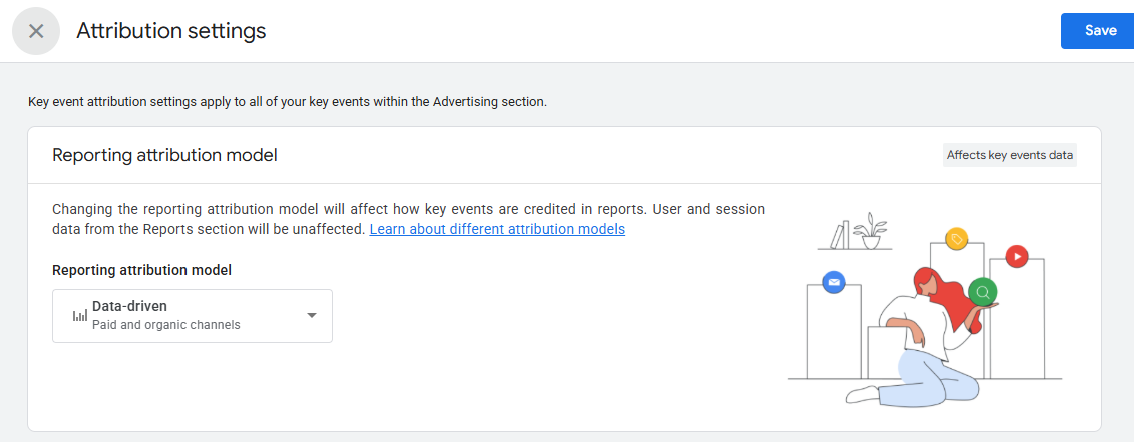
- Under Data display, click Events, then Key events attribution (Google also labels this screen Attribution settings).
- In the Reporting attribution model section, choose Data-driven (recommended) or Last click for paid and organic channels. Google paid channels has its own Last click setting.
- Click Save.
How data-driven attribution changes the story
Consider an illustrative SaaS journey:
- A buyer discovers a category article through organic search.
- They later see a LinkedIn retargeting ad.
- They return through a branded Google search ad.
- They request a demo.
Paid-and-organic last click assigns the demo request to branded paid search. That is a legitimate answer to a late-stage capture question.
The data-driven model may split credit across the organic article, the LinkedIn interaction, and the branded search ad. That better answers which observed interactions appeared to contribute to the demo request.
Neither answer means that every credited touchpoint caused the demo. Neither answer establishes the revenue value of the demo. The right next step is to compare the web attribution view with downstream outcomes: qualified-demo rate, sales acceptance, opportunity creation, pipeline, win rate, time to activation, retention, and expansion.
The model is most useful when it changes a decision you can test. If a channel gains credit under it and also feeds high-quality, progressing opportunities, protect or expand that investment. If it gains credit but quality stays weak, check targeting, message, landing-page fit, and measurement before increasing spend.
The reporting-scope trap: why GA4 reports can disagree without being broken
The same customer journey can produce different answers in GA4 because traffic-source dimensions have different scopes.
User-scoped dimensions such as First user source or First user medium describe how GA4 first acquired the user. They are useful for acquisition-cohort analysis.
For session-scoped dimensions, GA4 uses the paid and organic channels last click model, whatever reporting model you select.
Event-scoped traffic dimensions such as Source, Medium, Campaign, and Default channel group can apply the property's selected reporting attribution model to key-event and revenue reporting.
Changing the reporting attribution model does not change every acquisition report. The User acquisition report (user-scoped) and the Traffic acquisition report (session-scoped) both use paid and organic channels last click. Your selected model applies to event-scoped dimensions in the Advertising reports: Attribution models (Model comparison) and Key event attribution paths.
The remedy is not to force every report to match. It is to name the question, use the correct scope, document the expected difference, and keep the definition consistent in dashboards and executive reporting.
Lookback windows are business assumptions, not a technical footnote
The attribution lookback window determines how far before a key event a touchpoint can be eligible for credit.
For the acquisition key events first_visit and first_open, GA4 defaults to a 30-day lookback window, with 7 days as the alternative. For all other key events, the default is 90 days, with 30 or 60 days as alternatives.
For SaaS, the correct window depends on the question and the motion.
- A self-serve trial start may have a short decision cycle and need a shorter window.
- A sales-assisted demo may benefit from a longer view of research and nurture activity.
- Enterprise pipeline may take months to close, but that does not automatically mean every web key event should use the longest available GA4 window.
Choose the window based on observed time to the specific key event, the distribution of path lag in GA4, CRM lead-to-opportunity timing, and the difference between self-serve and sales-led motions. Document the rationale. A lookback change applies going forward, so it should be treated as a controlled measurement decision, not a reporting convenience.
How to compare GA4 attribution models without creating reporting chaos
Start by selecting a single, meaningful key event. Do not aggregate newsletter signups, content downloads, demo requests, trial starts, and purchases as though they represent the same economic value.
For most SaaS teams, the comparison sequence should look like this:
- Select one key event, such as a verified demo request, trial start, or paid subscription.
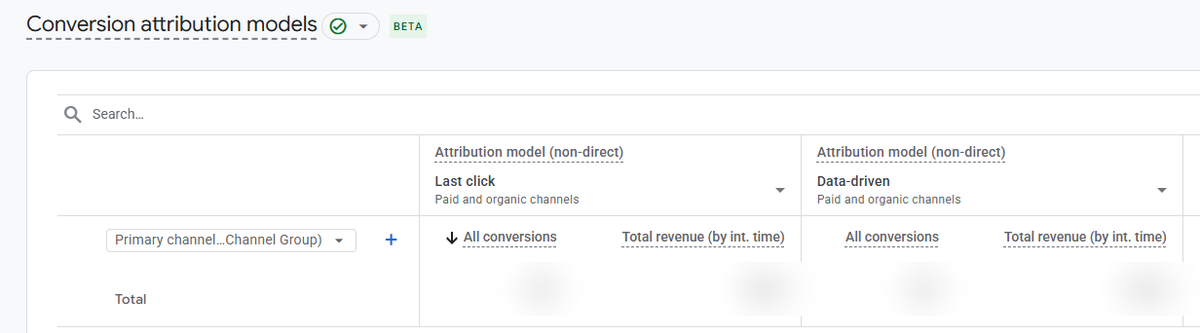
- Use the GA4 Attribution models report to compare paid-and-organic data-driven attribution with paid-and-organic last click.
- Review the largest channel and campaign shifts rather than chasing small decimal changes.
- Open the Key event attribution paths report (the Conversion paths report in older guides) to review Early, Mid, and Late touchpoints, Days to key event, and Touchpoints to key event.
- Reconcile the high-level GA4 finding with product activation, CRM lifecycle stages, opportunity progression, and revenue.
- Create a decision rule: scale, protect, investigate, or reduce.
For example, a content program may look weak under last click but repeatedly appear early in high-quality demo paths. A branded-search campaign may dominate last-click credit but function primarily as demand capture. Both can be valuable; they simply require different performance expectations and budget logic.
The goal is not to pick a report winner. The goal is to avoid reallocating budget away from channels that are creating or assisting quality demand because a closing channel receives all the last-click credit.
Why GA4 attribution fails before the model is selected
Attribution model choice is often blamed for problems caused by implementation and governance.
Common failure points include:
- Multiple tags writing or overwriting UTM values.
- Blank URLs, internal navigation, or direct visits replacing valid acquisition context.
- Inconsistent campaign, source, medium, or click-ID naming across ad platforms, GA4, forms, and CRM fields.
- Redirects and JavaScript-driven CTAs that drop query parameters.
- Broken cross-domain measurement between the marketing site, product, scheduler, checkout, or payment provider.
- Self-referrals that split one customer journey into several apparent acquisition sessions.
- Duplicate page views or conversion events sent to unintended GA4 properties.
- Consent sequencing that captures a conversion but loses the acquisition context, or the reverse.
- Key events that fire on a CTA click rather than a confirmed form submission, account creation, or successful purchase.
- CRM field rules that overwrite original source data as a lead becomes a contact or opportunity.
First-touch and last-touch rules need to be explicit. First touch should be durable and protected from later blank or direct overwrites. Last touch should update only when a legitimate new campaign interaction, paid click ID, or external referral occurs. The system should never allow internal navigation to manufacture new marketing credit.
Build a SaaS attribution system around GA4, not inside GA4 alone
GA4 should be the web-behavior layer of a broader measurement architecture.
At the web layer, GA4 and Google Tag Manager should measure entry pages, campaign context, CTA clicks, form starts, demo requests, trial signups, and cross-domain journeys.
At the product layer, your application, product analytics, or warehouse should measure account creation, activation milestones, workspace creation, feature adoption, trial-to-paid conversion, upgrades, churn, and retention.
At the revenue-operations layer, your marketing automation platform and CRM should measure lead creation, ICP fit, MQL/PQL/SQL definitions, sales acceptance, opportunity stages, pipeline amount, closed-won revenue, and controlled campaign-influence fields.
At the decision layer, a dashboard should bring these signals together without pretending they are identical. GA4 is the source for observed web behavior under its collection rules. The CRM is the source for qualified pipeline and sales stages. Product and billing systems are the source for activation, subscriptions, retention, and realized revenue.
This arrangement makes the differences productive. Instead of arguing about whether Google Ads, GA4, HubSpot, Salesforce, and billing totals match exactly, the team can identify why they differ and decide which system answers which business question.
How DataXGrowth turns GA4 attribution into better SaaS performance
DataXGrowth is a SaaS-focused GA4 and attribution agency that helps teams connect Google Analytics 4 measurement, strategy, and execution. The objective is not to make every dashboard show the same number. It is to make the differences explainable, the underlying data trustworthy, and performance decisions more reliable.
The work starts with a measurement diagnostic across GA4, Google Tag Manager, UTMs, click IDs, consent, cross-domain paths, forms, and CRM fields. From there, DataXGrowth separates diagnostic micro-events from business outcomes, connects the tracking and CRM pieces, and compares data-driven and last-click credit against pipeline quality before recommending where to scale spend.
If your team is making spend decisions with incomplete source data, conflicting dashboards, unreliable conversion tracking, or no clear connection from web acquisition to pipeline, a DataXGrowth Growth Audit provides a prioritized roadmap across tracking, attribution, reporting, conversion, and growth execution.
Frequently asked questions about GA4 attribution models
What is the default attribution model in GA4?
Data-driven attribution is the default for event-scoped traffic dimensions. User-scoped and session-scoped dimensions use paid and organic channels last click, and changing the reporting model does not affect them.
Is first-click attribution still available in GA4?
No. First click, linear, time decay, and position-based attribution were removed as selectable GA4 models in November 2023. For first-touch questions, use first-user acquisition dimensions or build a controlled first-touch analysis outside standard GA4 attribution reporting.
Is data-driven attribution better than last click?
Usually, for multi-touch paths, because it can split credit across several touchpoints. It is not automatically better data. If tracking is incomplete, conversion events are weakly defined, or CRM and product outcomes are disconnected, the model can still lead to poor decisions. Use last click as a baseline and the data-driven view as a contribution view, then validate both against downstream quality.
Why do GA4 and Google Ads show different conversions?
The platforms can use different attribution models, channel-credit settings, conversion windows, identities, counting rules, time zones, consent behavior, modeling, and import timing. The goal is to understand and control material differences, not force unrelated reports into false equality.
Can GA4 measure SaaS revenue attribution?
GA4 can attribute observed key events and revenue events that it receives. Complete SaaS revenue measurement generally requires product, CRM, billing, and often warehouse data because activation, opportunity creation, revenue, retention, and expansion occur beyond the browser journey.
What lookback window should a SaaS company use?
Use a window that reflects the observable lag to the specific key event and your business motion. Review time to key event, attribution paths, CRM conversion timing, and product behavior. Do not copy a universal setting simply because another company uses it.
Use attribution to improve decisions, not manufacture certainty
Collect reliable touchpoints, define meaningful conversions, pick a model and lookback window that fit the question, and connect web signals to product and revenue outcomes. The goal is not perfect agreement between systems. It is measurement your team trusts enough to decide what to scale, fix, or stop.
To identify the tracking, attribution, and funnel gaps hiding your next growth lever, request a DataXGrowth Growth Audit.